2026 년 4 월

1

2

3

4

5

6

7

8

9

10

11

12

13

14

15

16

17

18

19

20

21

22

23

24

25

26

27

28

29

30

 
그누스킨 그누소스 소스변경 소스문법 홈준비 기타
 
작성일 : 12-04-22 18:52
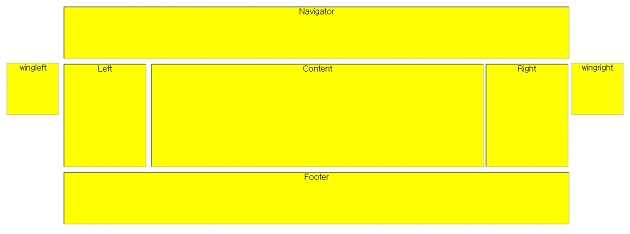
[기타] CSS를 이용한 DIV 레이아웃
 글쓴이 : Morning (211.♡.235.69)
조회 : 11,555  
   http://sir.co.kr/bbs/board.php?bo_table=pg_html&wr_id=12703 [3055]
<!DOCTYPE html PUBLIC "-//W3C//DTD XHTML 1.0 Transitional//EN" "http://www.w3.org/TR/xhtml1/DTD/xhtml1-transitional.dtd">
<html xmlns="http://www.w3.org/1999/xhtml">
<head>
    <title>div 태그로 레이아웃 설정</title>
    <style type="text/css">
        body { text-align:center; margin-top:10; padding:0; width:100%; height:100%;}
       
        #wrapper {
            margin:0 auto; width:1210px;
        }
        #wingleft {
            float:left; margin-top:110px; margin-right:10px; width:100px; height:100px; border:1px solid silver; background:yellow;
        }
        #wingright {
            float:right; margin-top:110px; width:100px; height:100px; border:1px solid silver; background:yellow;
        }
       
        #wrapperb {
            float:left; margin:0 auto; width: 990px;
        }
        #header {
            width:990px; height:100px; background-color:Yellow; border:groove 1px silver;
            padding:0px 0px 0px 0px; margin:0px auto 10px;}
       
        #left{
            width:160px; height:200px; background-color:Yellow; border:groove 1px silver;
            padding:0px 0px 0px 0px; margin:0px 10px 0px 0px;
            float:left;}
       
        #content{
            width:650px; height:200px; background-color:Yellow; border:groove 1px silver;
            padding:0px 0px 0px 0px; margin:0px 0px 0px 0px;
            float:left;}
           
        #right{
            width:160px; height:200px; background-color:Yellow; border:groove 1px silver;
            padding:0px 0px 0px 0px; float:right;}
           
        #footer{
            width:990px; height:100px; background-color:Yellow; border:groove 1px silver;
            padding:0px 0px 0px 0px; margin:10px 0px 0px 0px;
            float:left;}
    </style>
</head>
<body>
 
        <div id="wrapper">
            <div id="wingleft">wingleft</div>
            <div id="wrapperb">
                <div id="header">Navigator</div>       
                <div style="float:left;width:990px;">
                    <div id="left">Left</div>
                    <div id="content">Content</div>
                    <div id="right">Right</div>
                    <div id="footer">Footer</div>
                </div>
            </div>
            <div id="wingright">wingright</div>
        </div>
 
   
</body>
</html>

주님과 함께 모닝커피를

Morning 12-04-22 18:53
 211.♡.235.69  
<!DOCTYPE html PUBLIC "-//W3C//DTD XHTML 1.0 Transitional//EN" "http://www.w3.org/TR/xhtml1/DTD/xhtml1-transitional.dtd">
<html xmlns="http://www.w3.org/1999/xhtml">
<head>
    <title>div 태그로 레이아웃 설정</title>
    <style type="text/css">
        body { text-align:center; width:100%; height:100%;}
       
        #header {
            width:994px; height:100px; background-color:Yellow;border:groove 1px silver;
            padding:0px 0px 0px 0px; margin:0px 0px 10px 0px;}
           
        #left{
            width:160px; height:200px; background-color:Yellow;border:groove 1px silver;
            padding:0px 0px 0px 0px; margin:0px 10px 0px 0px;
            float:left;}
       
        #content{
            width:650px; height:200px; background-color:Yellow;border:groove 1px silver;
            padding:0px 0px 0px 0px; margin:0px 0px 0px 0px;
            float:left;}
           
        #right{
            width:160px; height:200px; background-color:Yellow;border:groove 1px silver;
            padding:0px 0px 0px 0px; margin:0px 0px 0px 10px;
            float:left;}
           
        #footer{
            width:994px; height:100px; background-color:Yellow;border:groove 1px silver;
            padding:0px 0px 0px 0px; margin:10px 0px 0px 0px;
            float:left;}
    </style>

</head>
<body leftmargin="3" marginwidth="3" topmargin="3" marginheight="3">
 
        <div id="header">Navigator</div>
        <div style="width:996px;">
            <div id="left">Left</div>
            <div id="content">Content</div>
            <div id="right">Right</div>
            <div id="footer">Footer</div> 
        </div>
 
   
</body>
</html>
Morning 12-04-22 18:54
 211.♡.235.69  
<!DOCTYPE html PUBLIC "-//W3C//DTD XHTML 1.0 Transitional//EN" "http://www.w3.org/TR/xhtml1/DTD/xhtml1-transitional.dtd">
<html xmlns="http://www.w3.org/1999/xhtml">
<head>
<title>div 태그로 레이아웃 설정</title>
<style type="text/css">
body {
text-align:center;
width:100%;
height:100%;
}
#header {
width:994px;
height:100px;
background-color:Yellow;
border:groove 1px silver;
padding:0px 0px 0px 0px;
margin:0px 0px 10px 0px;
}
#left {
width:160px;
height:200px;
background-color:Yellow;
border:groove 1px silver;
padding:0px 0px 0px 0px;
margin:0px 10px 0px 0px;
float:left;
}
#content {
width:650px;
height:200px;
background-color:Yellow;
border:groove 1px silver;
padding:0px 0px 0px 0px;
margin:0px 0px 0px 0px;
float:left;
}
#right {
width:160px;
height:200px;
background-color:Yellow;
border:groove 1px silver;
padding:0px 0px 0px 0px;
margin:0px 0px 0px 10px;
float:left;
}
#footer {
width:994px;
height:100px;
background-color:Yellow;
border:groove 1px silver;
padding:0px 0px 0px 0px;
margin:10px 0px 0px 0px;
float:left;
}
</style>
</head>
<body leftmargin="3" marginwidth="3" topmargin="3" marginheight="3">
<div id="header">Navigator</div>
<div style="width:996px;">
  <div id="left">Left</div>
  <div id="content">Content</div>
  <div id="right">Right</div>
  <div id="footer">Footer</div>
</div>
</body>
</html>

- 끝 -


Total 8
번호 제   목 글쓴이 날짜 조회
8 [기타] 그룹여분필드 (1) Morning 01-28 7044
7 [기타] CSS를 이용한 DIV 레이아웃 (2) Morning 04-22 11556
6 [기타] 관리자비번 잃어버렸을 때에 Morning 04-17 7026
5 [기타] 지워지지않는 디렉토리 지우기 (2) Morning 04-07 8442
4 [기타] 부드럽게 슬라이딩 되면서 펼쳐지는 메뉴구… Morning 03-20 5544
3 [기타] [메뉴] 플래쉬 같은 메뉴 Morning 03-20 5356
2 [기타] [메뉴] 서브메뉴가 있는 가로형 깔끔한 텍스… Morning 03-20 5607
1 [기타] [네비게이션] 제목 항목을 클릭하면 내용이 … Morning 03-20 5446

Therefore, holy brothers, who share in the heavenly calling,
fix your thoughts on Jesus, the apostle and high priest whom we confess.
Let us fix our eyes on Jesus, the author and perfecter of our faith,
who for the joy set before him endured the cross, scorning its shame,
and sat down at the right hand of the throne of God